AI Chatbots for Web Applications: Implementation with LangChain, OpenAI, and Streaming
How to build production-grade chatbots that handle history, specialized tools, and streaming UI. We cover the Vercel AI SDK, LangChain runnables, and session management.


Technical Overview
A “Chatbot” is no longer a rigid decision tree. It is an Agentic Interface. Modern chatbots need to: maintain conversation history, stream responses token-by-token (for perceived speed), and call external tools (APIs) to perform actions. The challenge for web developers is managing the State (History) and the Stream (UI updates) efficiently without blocking the main thread.
Technology Maturity: Production-Ready Best Use Cases: Customer Support, Internal Data Assistants, Copilots. Prerequisites: React 19, Vercel AI SDK, Redis (for history).
How It Works: Technical Architecture
System Architecture:
[React Client] <--(Stream HTTP/2)--> [Next.js Edge Route]
       |                                     |
[useChat Hook]                         [Vercel KV (History)]
       |                                     |
       +--(Optimistic UI Updates)      [LangChain Chain] -> [OpenAI]
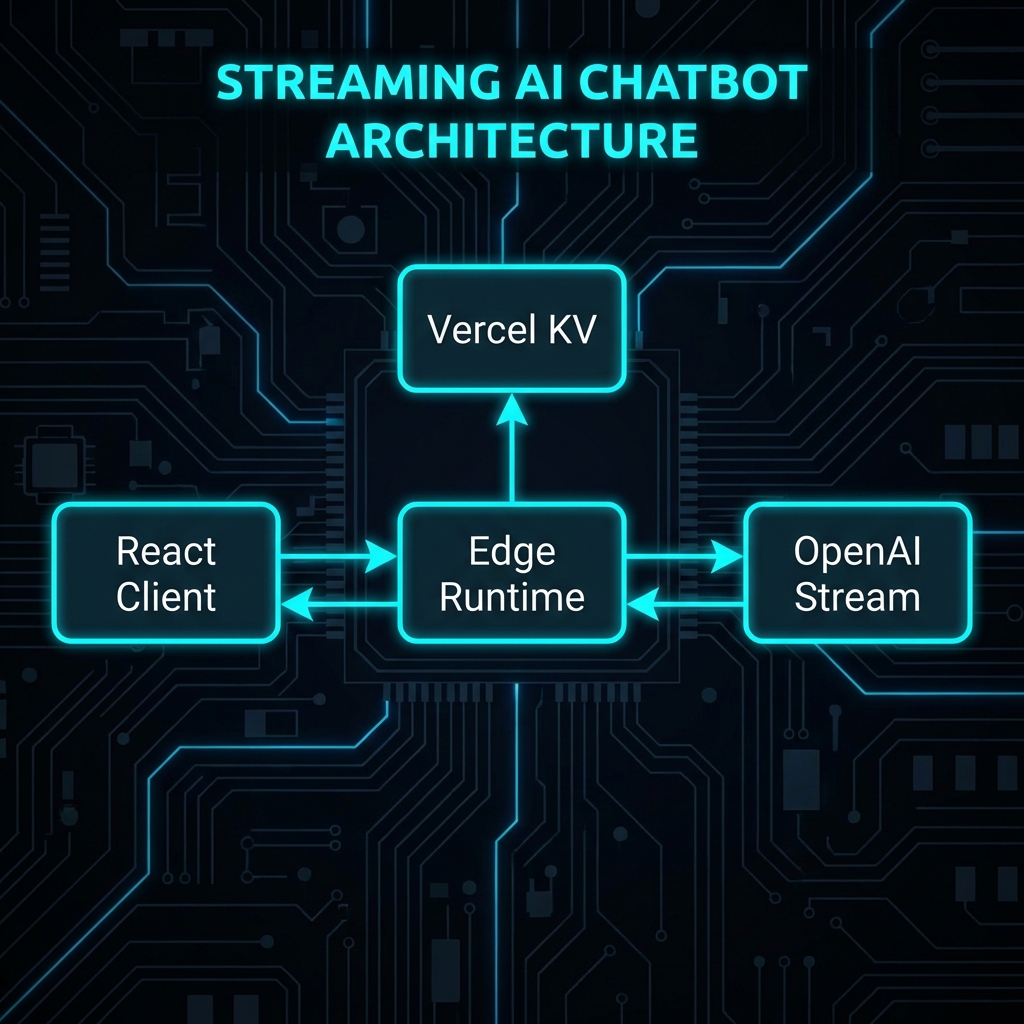
Key Components:
- Vercel AI SDK (
ai): Standardizes the streaming protocol between server and client hooks. - LangChain (
runnable):: Defines the logic pipeline (Prompt -> Model -> Output Parser). - Edge Runtime: Keeping the connection open for the stream without timing out serverless limits.
Implementation Deep-Dive
Setup and Configuration
npm install ai openai zod
Core Implementation: The React Client
// Framework: React 19 / Vercel AI SDK 3.x
// Purpose: Chat Interface with Streaming

'use client';

import { useChat } from 'ai/react';

export default function ChatInterface() {
  const { messages, input, handleInputChange, handleSubmit, isLoading } = useChat({
    api: '/api/chat',
    initialMessages: [], // Hydrate history here if needed
    onError: (err) => console.error('Chat error:', err)
  });

  return (
    <div className="flex flex-col h-[600px]">
      <div className="flex-1 overflow-y-auto p-4 space-y-4">
        {messages.map(m => (
          <div key={m.id} className={`message ${m.role}`}>
            <span className="font-bold">{m.role === 'user' ? 'You' : 'AI'}:</span>
            <p className="whitespace-pre-wrap">{m.content}</p>
          </div>
        ))}
      </div>

      <form onSubmit={handleSubmit} className="p-4 border-t">
        <input
          value={input}
          onChange={handleInputChange}
          className="w-full p-2 border rounded"
          placeholder="Ask me anything..."
          disabled={isLoading}
        />
      </form>
    </div>
  );
}
Backend API: Streaming Route
// Framework: Next.js App Router (Edge Runtime)
// Purpose: Stream LLM response

import { OpenAIStream, StreamingTextResponse } from 'ai';
import OpenAI from 'openai';

// Important: Use Edge runtime for long-lived streams
export const runtime = 'edge';

const openai = new OpenAI({
  apiKey: process.env.OPENAI_API_KEY,
});

export async function POST(req: Request) {
  try {
    const { messages } = await req.json();

    const response = await openai.chat.completions.create({
      model: 'gpt-4o-mini',
      stream: true,
      messages: [
        { role: 'system', content: 'You are a helpful coding assistant.' },
        ...messages
      ],
      temperature: 0.7,
    });

    // Convert raw API stream to friendly text stream
    const stream = OpenAIStream(response);

    // Return standard response
    return new StreamingTextResponse(stream);

  } catch (error) {
    return new Response('Error processing chat', { status: 500 });
  }
}
Framework & Tool Comparison
| Framework | Core Approach | Performance | DX | Pricing | Best For |
|---|---|---|---|---|---|
| Vercel AI SDK | Full-Stack Hooks | Optimized Streaming | rating: 10/10 | Free (Open Source) | Next.js Apps |
| LangChain.js | Composition | Moderate (Heavy abstraction) | Steep learning curve | Free (Open Source) | Complex Logic |
| Botpress | Low-Code | Managed Cloud | GUI-based | Free Tier / $$ | Non-coders |
| Deepgram | Voice-First | Real-time Audio | Specialized | $$ | Voice Bots |
Performance, Security & Best Practices
Latency Reduction
Streaming is Mandatory.
Waiting 3 seconds for a full answer feels broken. Streaming the first token in 400ms feels instant.
Use gpt-4o-mini or haiku for simple interactions to keep Time-To-First-Token (TTFT) under 500ms.

History Management
Don’t send the entire conversation history (which can be 50k tokens) to the API on every turn. If you need to query a large knowledge base (like documentation or past support tickets), simple history isn’t enough. You should implement Retrieval Augmented Generation (RAG) to fetch only relevant context.
Summarization Strategy:
If messages.length > 10:
- Ask LLM to “Summarize the last 10 messages into one paragraph.”
- Replace the 10 messages with the System Prompt:
Previous context: [Summary].
Security: Prompt Injection
Input Validation is not enough. You must allow-list “Tools.” If your bot can query a database, ensure the SQL Agent runs with a Read-Only DB user.
Recommendations & Future Outlook
When to Adopt:
- Now: Every B2B SaaS dashboard should have a “Ask AI” helper. It reduces support ticket volume by 30-50%[2].
Future Evolution (2026-2028):
- Generative UI: The bot won’t just output text; it will yield React Components. “Show me sales” -> Bot renders a Chart Component directly in the chat stream (supported by Vercel AI SDK 4.0+).

References
[1] Vercel, “Vercel AI SDK Documentation,” 2026. [2] Intercom, “State of AI Customer Service 2025.” [3] LangChain, “Streaming Protocols for LLMs,” 2025.
Related Articles

Generative UI: Building Dynamic Interfaces with AI-Driven Component Generation
The UI is no longer static. Learn how to use Vercel AI SDK to stream React Components from the server based on user intent, creating truly adaptive interfaces.

Natural Language Database Queries: Text-to-SQL and AI-Powered Data Access Layers
Building secure Text-to-SQL interfaces. We verify generated SQL, restrict permissions, and implementation using LangChain SQLDatabase Chain and Prisma.
Building RAG-Powered Web Apps: Vector Databases, Embeddings, and Semantic Search
A deeply technical guide to implementing Retrieval Augmented Generation (RAG) in Next.js applications using Pinecone, OpenAI Embeddings, and LangChain.